Device Details
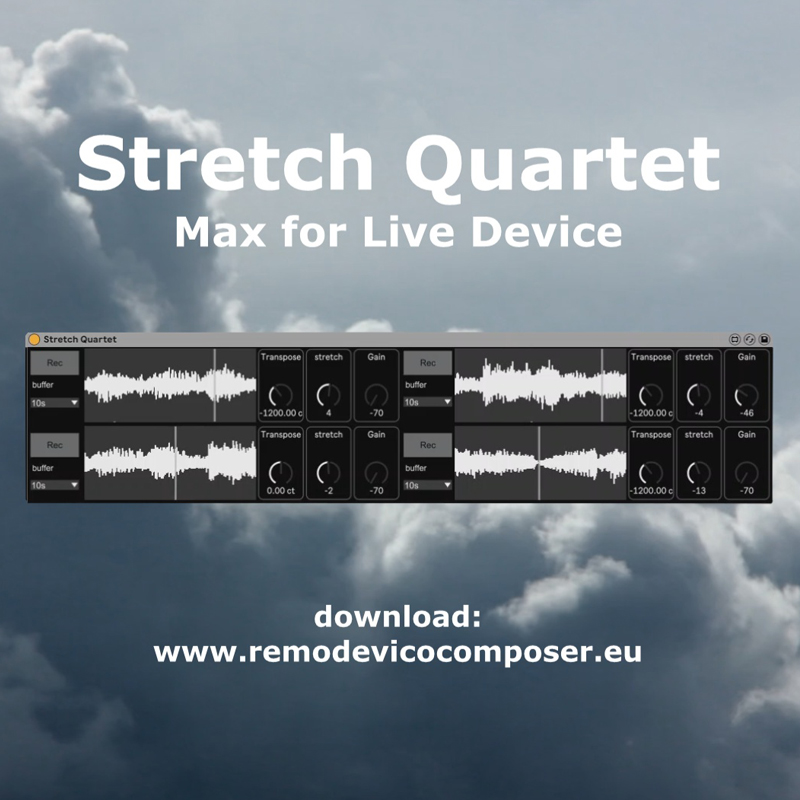
Overview
| Name | Version: | Stretch Quartet 1.0 |
| Author: | RemoDeVico |
| Device Type: | Audio Effect |
| Description: | Stretch Quartet download: https://www.remodevicocomposer.eu/maxforlive/stretch-quartet/ programmed by Remo De Vico #ableton #abletonlive #sound #sounddesign #texture #computermusic #electronicmusic #musicproducer #music #maxforlive #maxmsp Stretch Quartet is an audio effect for Ableton Live dedicated to time-stretching techniques. It provides four independent buffers where you can record audio sequences ranging from 2 to 60 seconds, simply by clicking the Off / Rec button. Each recorded sequence becomes an autonomous temporal layer with its own set of controls. For every buffer you can adjust: Pitch, from –48 to +48 semitones Time-stretch playback speed, with negative values playing in reverse and positive values preserving forward time Gain, allowing precise control over the balance between the four sequences Stretch Quartet features five stereo outputs: one master output containing the full mix, and four dedicated outputs, one for each buffer. This routing system allows you to build custom effect chains per sequence and to manage spatialization with great precision. Stretch Quartet is a powerful tool for transforming a single sound into evolving textures check out my music on https://www.remodevicocomposer.eu/ |
Details
| Live Version Used: | 10.1 |
| Max Version Used: | 8.0.4 |
| Date Added: | Jan 15 2026 12:48:55 |
| Date Last Updated: | No Updates |
| Downloads: | 0 |
| Website: | https://www.remodevicocomposer.eu/maxforlive/stretch-quartet/ |
| ⓘ License: | Commercial |
Average Rating
Log in to rate this device |
-n/a- |
Comments
example: https://youtu.be/fdxgfvsoHk0
Posted on January 15 2026 by RemoDeVico |
Report Issue
Hi, I just downloaded the device. It is a very good idea, not new but a different approach!
A question:
"Stretch Quartet features five stereo outputs: one master output containing the full mix and four dedicated outputs, one for each buffer":
How to access the individual outputs in Ableton Live 12.3 so that I could send them to different outputs/sends?
It would be great to have:
- a panorama option per track
- higher resolution of the transpose knobs for slight out of tune effects.
- the transpose knob(s) should change in chromatic steps when holding shift on the keyboard.
- better quality of the time stretching! or even better: let me choose from different qualities/artefacts.
- a selectable fade out time when switching off the recorded sample (per track or global)
Thanks a lot and many greetings from hamburg
;-)
A question:
"Stretch Quartet features five stereo outputs: one master output containing the full mix and four dedicated outputs, one for each buffer":
How to access the individual outputs in Ableton Live 12.3 so that I could send them to different outputs/sends?
It would be great to have:
- a panorama option per track
- higher resolution of the transpose knobs for slight out of tune effects.
- the transpose knob(s) should change in chromatic steps when holding shift on the keyboard.
- better quality of the time stretching! or even better: let me choose from different qualities/artefacts.
- a selectable fade out time when switching off the recorded sample (per track or global)
Thanks a lot and many greetings from hamburg
;-)
Posted on January 15 2026 by spacesoul |
Report Issue
Login to comment on this device.
Browse the full library